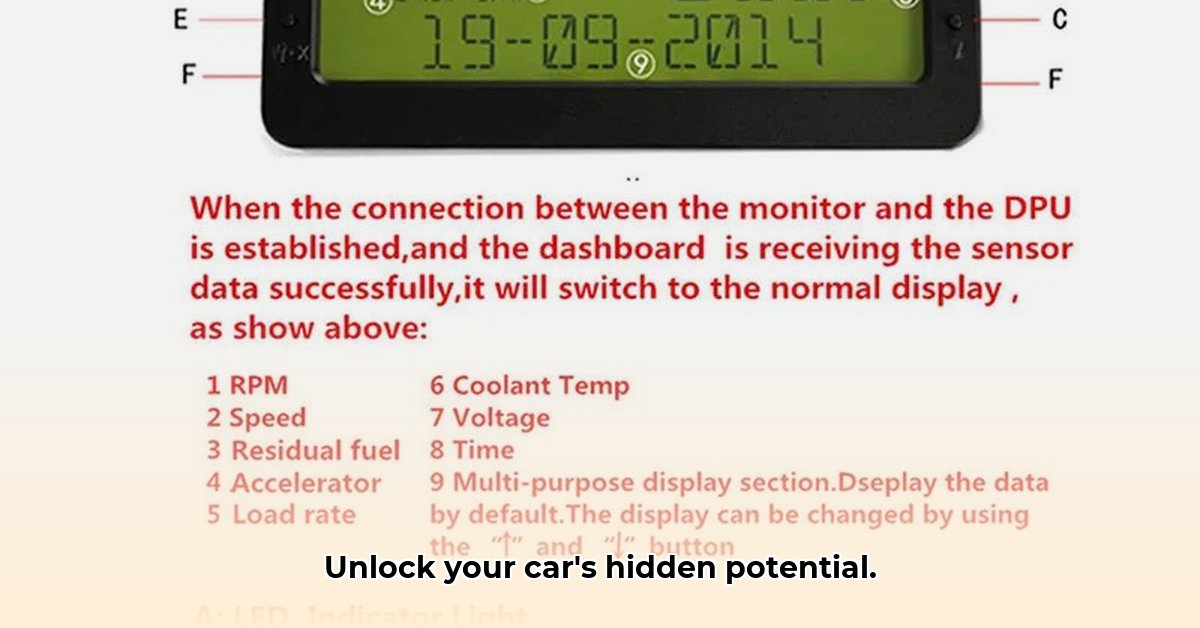
Want to transform your driving experience? Customizable OBD2 dash displays are taking the automotive aftermarket by storm, offering a wealth of real-time vehicle data and personalization options. This guide will walk you through everything you need to know, from understanding the market to installing and customizing your own display. Whether you're a seasoned car enthusiast or a curious novice, we'll make this process clear and straightforward.
Navigating the OBD2 Dash Display Market
The market for OBD2 dash displays is booming, driven by drivers' increasing desire for enhanced vehicle information and control. These displays plug into your car's On-Board Diagnostics II (OBD-II) port, providing real-time data on various engine parameters. But the sheer variety can be overwhelming. The key is choosing a device that meets your needs and is compatible with your specific vehicle. One critical factor to consider is the communication protocol used by your vehicle – pre-CAN-BUS or CAN-BUS – ensuring compatibility with the selected display. This preliminary step can save you trouble later.
Key Market Trends:
- Increased demand for personalized displays: Drivers are seeking more than basic information; they want real-time feedback tailored to their specific vehicle.
- Growing emphasis on advanced features: Data logging, custom alerts, and integration with other vehicle systems are becoming increasingly common.
- Expanding compatibility: Manufacturers are striving for broader compatibility across various vehicle makes and models.
Types of OBD2 Dash Displays
OBD2 dash displays come in several forms, each offering unique advantages and disadvantages:
Smartphone Apps
- Advantages: Affordable, readily available, often feature-rich.
- Disadvantages: Relies on phone's battery, screen size limitations, potential distraction while driving.
Small Dedicated Screens
- Advantages: Compact, easy to mount, usually self-powered.
- Disadvantages: Fewer features and customization options compared to larger displays.
Large Dedicated Screens
- Advantages: Highly customizable, large, easily-readable displays, often with advanced data-logging.
- Disadvantages: More expensive, installation might be more involved.
Choosing the right type depends on your budget, technical proficiency, and desired features. Do you need a simple fuel efficiency monitor, or a comprehensive performance analysis tool?
Technical Deep Dive: Understanding OBD-II
OBD-II (On-Board Diagnostics II) is a system built into most vehicles to monitor the engine's performance. The OBD-II port allows communication with a diagnostic tool (your OBD2 display) using standardized data protocols. This communication transmits various data points, including engine speed (RPM), vehicle speed, fuel economy, coolant temperature, and more. Understanding these basics will help you make an informed purchase and troubleshoot any eventual problems. Different displays interpret and display this data in various ways, leading to the range of features offered on the market.
How to Choose Your OBD2 Gauge Display
Selecting the perfect OBD2 dash display involves careful consideration:
Vehicle Compatibility: Crucially, verify compatibility with your car's make, model, and year. Check the manufacturer's website or consult your vehicle's manual. This is paramount.
Desired Features: Consider your needs: Basic engine data, advanced performance metrics, data logging, custom alerts, etc.
Budget: Prices vary significantly based on features and brand. Set a realistic budget before buying.
Technical Expertise: Some displays are plug-and-play; others require more technical skill for installation.
Installation and Setup
Installing is generally straightforward but differs across models. Always consult your chosen display's manual. Generally, you will:
- Locate the OBD-II port (usually under the dashboard).
- Connect the display's connector to the port.
- Power the display (some require a separate power source).
- Configure settings (customize data view, alerts).
Advanced Features and Customization
Many displays permit extensive customization. Adjust color schemes, data displays, set custom alerts for critical parameters (e.g., high engine temperature), and log data for performance analysis. This level of customization enhances both the usability and the value of your OBD2 gauge. Data logging, for instance, can be invaluable for monitoring performance trends and identifying potential issues.
Troubleshooting and Common Issues
Here are some of the issues you might encounter and how to deal with them:
- No Data: Check connections, ensure proper power, and restart the vehicle.
- Inaccurate Readings: Verify sensor compatibility, update software (if available).
- Error Messages: Refer to the manual, or consult the manufacturer's support resources.
Conclusion: Drive Smarter
OBD2 dash displays offer a powerful upgrade, providing greater insight into your vehicle's performance and health. Choosing the right display involves careful consideration of compatibility, features, and budget. With proper installation and understanding, your OBD2 dash display will elevate your driving experience. Remember to always prioritize compatibility and choose a reputable brand for a reliable and enjoyable upgrade.
⭐⭐⭐⭐☆ (4.8)
Download via Link 1
Download via Link 2
Last updated: Monday, June 02, 2025